Features / Visual Tour Builder
Visual Tour Builder — Build Product Tours Without Code
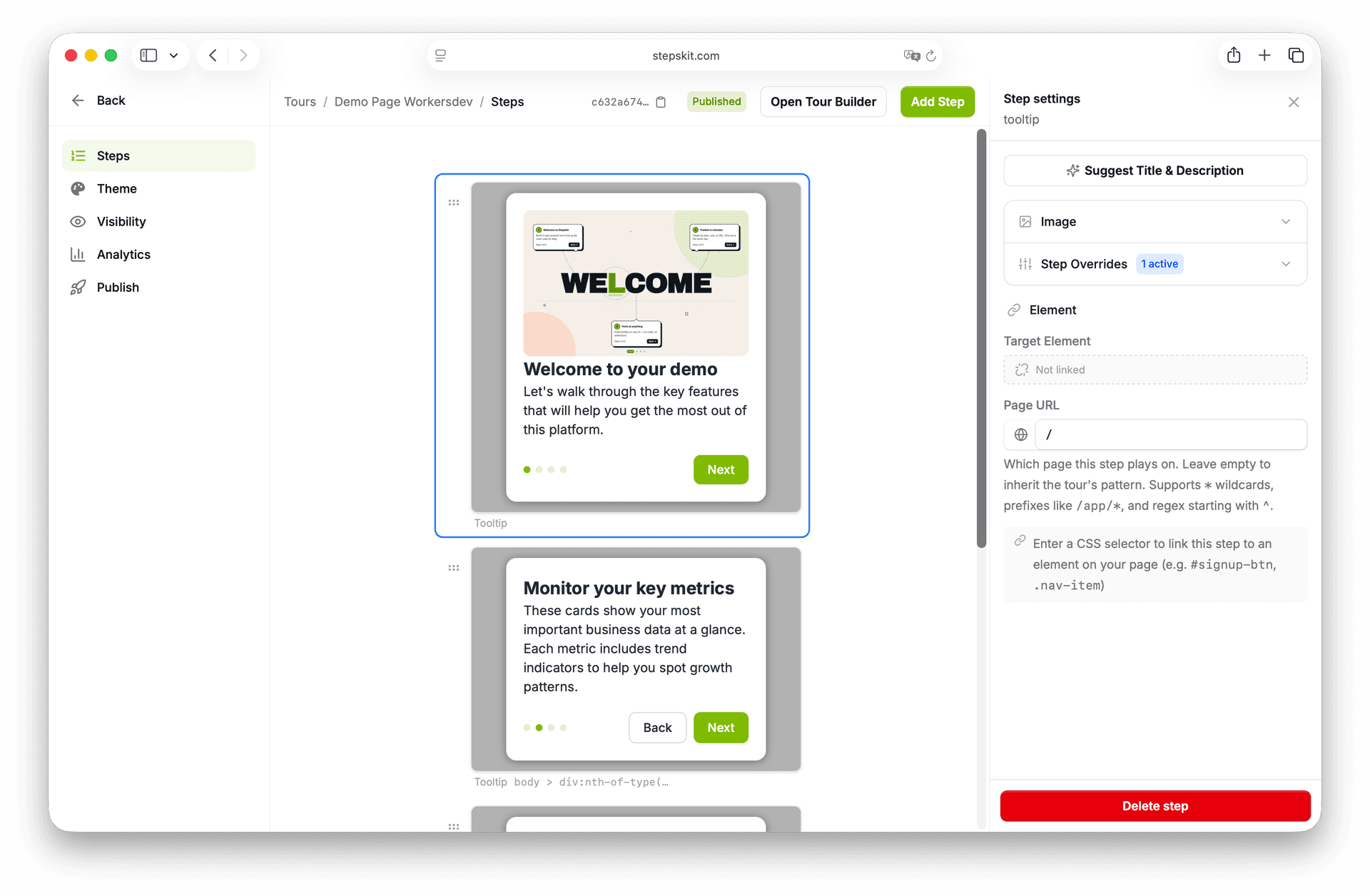
A no-code product tour builder that runs on your live app. Click any element to anchor a step, write the copy inline, arrange the flow on a visual canvas, and publish — no engineering tickets, no rebuilds, no framework lock-in.
Last updated: May 2026
What is a product tour builder?
A product tour builder is a no-code tool that lets non-engineers create interactive walkthroughs inside a SaaS application. The builder provides a visual editor — usually a point-and-click element picker plus a canvas — for anchoring steps to live UI elements, writing the popover copy, arranging the sequence, and publishing the tour to production. The output is an in-app overlay that highlights one element at a time and explains it.
A visual tour builder replaces the alternative — engineers wiring up selectors, writing step copy in JSX, shipping a new build for every edit. The dashboard handles authoring, the embed handles runtime, and changes go live without a redeploy. Same surface as in-app tooltips, same install, same audience rules.
Why building tours by hand stops working
The first tour is easy. A product manager writes a Notion doc with five steps, an engineer wires it up in an afternoon, the team ships it. Then the copy needs a tweak. Then a step needs to move. Then a new feature launches and the tour needs three more steps. Every iteration is a PR, a review, a deploy, a smoke test — and the backlog stops being worth it before the second feature launch.
A hand-rolled tour also has no analytics, no audience targeting, and no frequency capping. Every visitor sees the same thing, every time, with no view into which step loses them. By the time the adoption metric needs to move, the team is rebuilding the missing infrastructure instead of writing tour copy.
A visual tour builder collapses the loop. The element picker runs on the live app, the copy lives in a dashboard, the analytics dashboard ships with the runtime, and publishing pushes the change to every embedded site instantly. The result is the same in-app experience, with day-of iteration instead of a sprint per change. Tours work alongside user onboarding and feature adoption surfaces, not against them.
What the visual tour builder can do
- Point-and-click element picker
- Open your live app from the dashboard and click any element to anchor a step. The builder generates a stable CSS selector that survives SPA route changes — no DOM hunting, no manual querySelector, no engineering ticket.
- Visual canvas, not a linear list
- Arrange steps on a horizontal canvas with drag-and-drop. Branch the flow, reorder steps, preview transitions — the structure of the tour is visible at a glance instead of buried in a numbered list.
- Live preview while you write
- Edit step copy in the dashboard and see it render in the popover instantly. No publish-then-check loop. The preview matches what your users see down to the theme colors and stage padding.
- Audience targeting and frequency capping
- Show a tour only to enterprise users, free-trial day-3 cohorts, or users on a specific URL. Cap to once per visitor so identified users never see the same intro twice. Anonymous visitors are handled separately.
- Themes that match your brand
- Per-tour theme overrides for popover background, text, button colors, overlay opacity, and stage padding. Step-level overrides take precedence when one moment needs to stand out. No CSS file to maintain, and a scoped Custom CSS escape hatch when you need it.
- Per-step analytics out of the box
- Every step emits viewed, next-clicked, prev-clicked, dismissed, and completed events. The dashboard shows where users drop off, which steps get skipped, and which tours actually finish — without wiring up your own tracker.
How it works
- 1
Connect your live app
Install StepsKit — one npm package if you have a bundler, one async script tag if you don't — and create a project in the dashboard. No framework lock-in: React, Next.js, Vue, Angular, or plain HTML.
- 2
Build the tour on a visual canvas
Click an element on your live app to anchor a step. Write the title and body inline. Arrange the sequence on the canvas. Repeat. Each step is a card you can reorder, branch, or delete without touching code.
- 3
Theme it and target the right users
Match your brand colors in the theme panel. Pick which audiences see the tour — by plan, role, custom attribute, or URL pattern. Set frequency capping so users see it at most once.
- 4
Publish to production
Hit publish. The tour goes live for visitors who match your rules — no redeploy, no rebuild. Edit copy and republish anytime; changes propagate instantly to every embedded site.
Product tour builder examples
First-run onboarding without a wall of modals
Replace the launch-day modal-takeover with a four-step tour that anchors to the real UI. Users see their actual data, click through at their own pace, and exit with a working mental model of the product — not a memory of dismissing a popup.
Announce a feature where it lives
Ship a new export button and target the tour to users who match the buyer persona. The tour starts on the page that contains the button, walks through one or two steps, and finishes — no all-hands email, no in-product banner that everyone ignores.
Recover an under-adopted workflow
Pull the drop-off list from the analytics dashboard, find the step that loses the most users, edit the copy, republish. The next cohort of visitors sees the improved tour — no PR review, no engineering bandwidth.
Tour builder vs. walkthrough builder vs. announcement tool
The category has three overlapping surfaces. The right pick depends on whether the user needs a guided sequence, a single anchored explanation, or a broadcast.
| Surface | Sequential? | Anchored? | Use when |
|---|---|---|---|
| Tour builder | Yes | Per-step | Walking a user through a multi-step workflow in order |
| Tooltip builder | No | Per-element | Persistent contextual help that waits for a click |
| Announcement | No | Banner / modal | Broadcasting a launch to every user at once |
Pick a tour builder when there is a workflow to learn — a setup wizard, a multi-step feature, a guided first-run flow. The tour walks the user from A to B in order, then exits.
Pick a tooltip builderwhen the help should wait on the page until the user is ready to ask. Tooltips don't interrupt and don't enforce a sequence — they live next to the element they explain.
Pick an announcement when reach matters more than persistence and the message is the same for every user. Use sparingly — modals interrupt, and interruption is a finite resource.
Build your first product tour free
No credit card. No engineering ticket. One async script tag and a visual canvas — go live in under five minutes.
Try the Tour Builder Free