Features / In-app Surveys
In-app surveys and NPS for SaaS products
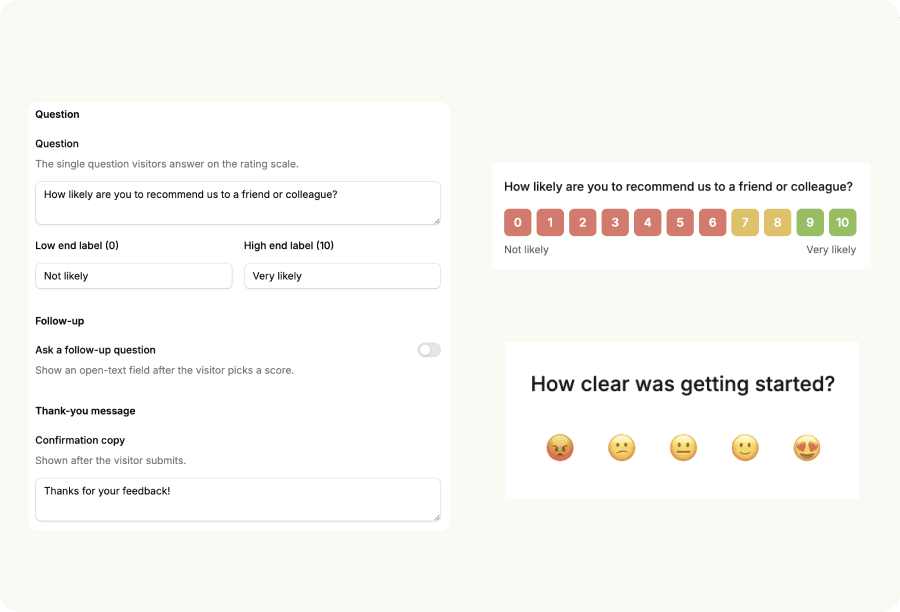
Ask one question right inside your product. A small card slides in, the visitor taps a score, and your NPS updates automatically — no separate survey tool, no email blast, no code.
Last updated: June 2026
What are in-app surveys?
In-app surveys are short questionnaires shown to users inside a product — usually a small card or banner — rather than over email or on a separate page. Because they reach people while they're actually using the product, they earn higher response rates and more relevant answers than an emailed survey.
The most common in-app survey is an NPS survey: a single “How likely are you to recommend us?” question on a 0–10 scale. Net Promoter Score was introduced by Fred Reichheld in the Harvard Business Review and is now the standard loyalty metric for SaaS. StepsKit ships the NPS instrument first, with 1–5 and emoji scales for lighter microsurveys. For the full walkthrough, see our guide to NPS survey questions.
Unlike a tour, which guides a user through a workflow, a survey collects input. It's the feedback half of in-app engagement — the way you measure whether your onboarding and feature adoption are actually landing.
Why emailed surveys don't tell you much
You email an NPS survey to your whole list. A handful of people reply — mostly the ones who already love you and the ones who are already furious. The quiet middle, the users who would actually move your score, never open the email. The result is a number built on a tiny, biased sample, collected days after the moment it was about.
A standalone survey tool fixes the channel but adds a second product to pay for, a second script to install, and a second set of audience rules to maintain — separate from the tours and tooltips already running in your app.
In-app surveys close that gap. The question appears where the user already is, while the experience is fresh. You target it the same way you target a tour — by plan, role, or page — and cap how often it shows. The visitor taps a score, optionally tells you why, and your NPS, promoters, passives, and detractors are tallied for you. No spreadsheet, no second tool, no export.
What in-app surveys can do
- Three rating scales
- Run the 0–10 NPS scale, a 1–5 numeric scale, or five sentiment emojis. Match the scale to the question and set your own low/high labels ("Not likely" → "Very likely").
- Optional open-text follow-up
- Add a second step that asks why — "What's the main reason for your score?" — to capture the qualitative comment behind the number. Then a thank-you message auto-closes the card.
- Targeting and re-survey windows
- Show by plan, role, URL, or any custom attribute you pass via the embed — the same rules engine as tours and tooltips. Set a re-survey window in days, or ask once and never again.
- No-code, on-brand card
- A small card slides in from the bottom corner — left or right, dismissible or not. Theme the background, text, and button colors to match your product. No engineering handoff.
- Your NPS score, computed for you
- Promoters (9–10), passives (7–8), detractors (0–6), and your NPS from −100 to +100 — calculated automatically. The 1–5 and emoji scales report an average plus a score distribution.
- One embed, no new install
- Surveys ride along in the same StepsKit embed as your tours and tooltips — no second install, no extra package, no extra request. If StepsKit is already on your site, you have surveys.
How it works
- 1
Create a survey in the dashboard
Name it, write your question, and pick a rating scale — 0–10 NPS, 1–5, or emoji. No code required; surveys live in the same dashboard as your tours and tooltips.
- 2
Choose who sees it, and how often
Target by plan, role, URL pattern, or any attribute, and set a minimum screen width. Pick a re-survey window in days so a visitor isn't asked again too soon.
- 3
Theme the card to your brand
Set the card's background, text, and button colors, choose the corner it slides in from, and decide whether it's dismissible. Add an open-text follow-up if you want the why.
- 4
Publish to your domain
Roll out to the domains you choose. The card appears for visitors who match your rules — instantly, with no app deploy. Responses and your NPS update in the dashboard.
In-app survey examples
Measure NPS without leaving your product
Instead of an email blast most users ignore, ask the recommend question in-app, in context, while the experience is fresh. Response rates are higher because the question reaches people who are actually using the product.
Catch detractors before they churn
Turn on the open-text follow-up to ask low scorers why. A detractor who tells you what's wrong is a save opportunity — and a pattern across comments is your roadmap.
Gauge a new feature with a microsurvey
Drop a 1–5 or emoji microsurvey on the page for a feature you just shipped. URL targeting keeps it scoped to that screen, so you learn how the new thing lands without surveying everyone.
Surveys vs. tours vs. tooltips
StepsKit ships three in-app surfaces. Two deliver something to the user; one listens. The right pick depends on whether you need to guide, to help in context, or to measure.
| Surface | Collects input? | Use when |
|---|---|---|
| Tours | No | Walking a user through a workflow in order |
| Tooltips | No | Persistent contextual help that waits for a click |
| Surveys | Yes | Measuring how users feel — NPS, CSAT-style ratings, feedback |
Pick tourswhen there's a workflow to learn, tooltips when users should find help in context, and surveys when you need to hear back from them. They reinforce each other: a tour onboards a user, a tooltip nudges adoption, and a survey tells you whether either worked.
Start measuring NPS inside your app
Create your first survey free — no credit card required. Same install as tours: one async script tag.
Try In-app Surveys Free